For building contractors in Tunisia
The construction management software that connects quotes, purchasing, time tracking, billing and margin
From the first quote to the profitability of the finished project: one app for the office, for the job site - even without signal - and for keeping your clients in the loop.
- Web app you can install on your phone
- Time tracking and photos even without signal
- Amounts in Tunisian dinars (DT)

Features
Six modules sharing the same data
A received quantity updates inventory, an approved timesheet feeds labor cost, an accepted quote becomes a project, an approved progress claim becomes an invoice. Nothing is entered twice.
Projects
- One record per project: client, budget, contract value, dates and status (from “Preparation” to “Handed over”).
- Split into work packages - structural work, electrical, plumbing, joinery… - and tasks tracked through to completion.
- Site diary kept by the site foreman, available to the whole authorized team.
- Photos taken on the phone and filed by project; you choose which ones the client can see.
Quotes & Sales
- Leads tracked step by step, from “New” to “Won”, then clients and contacts.
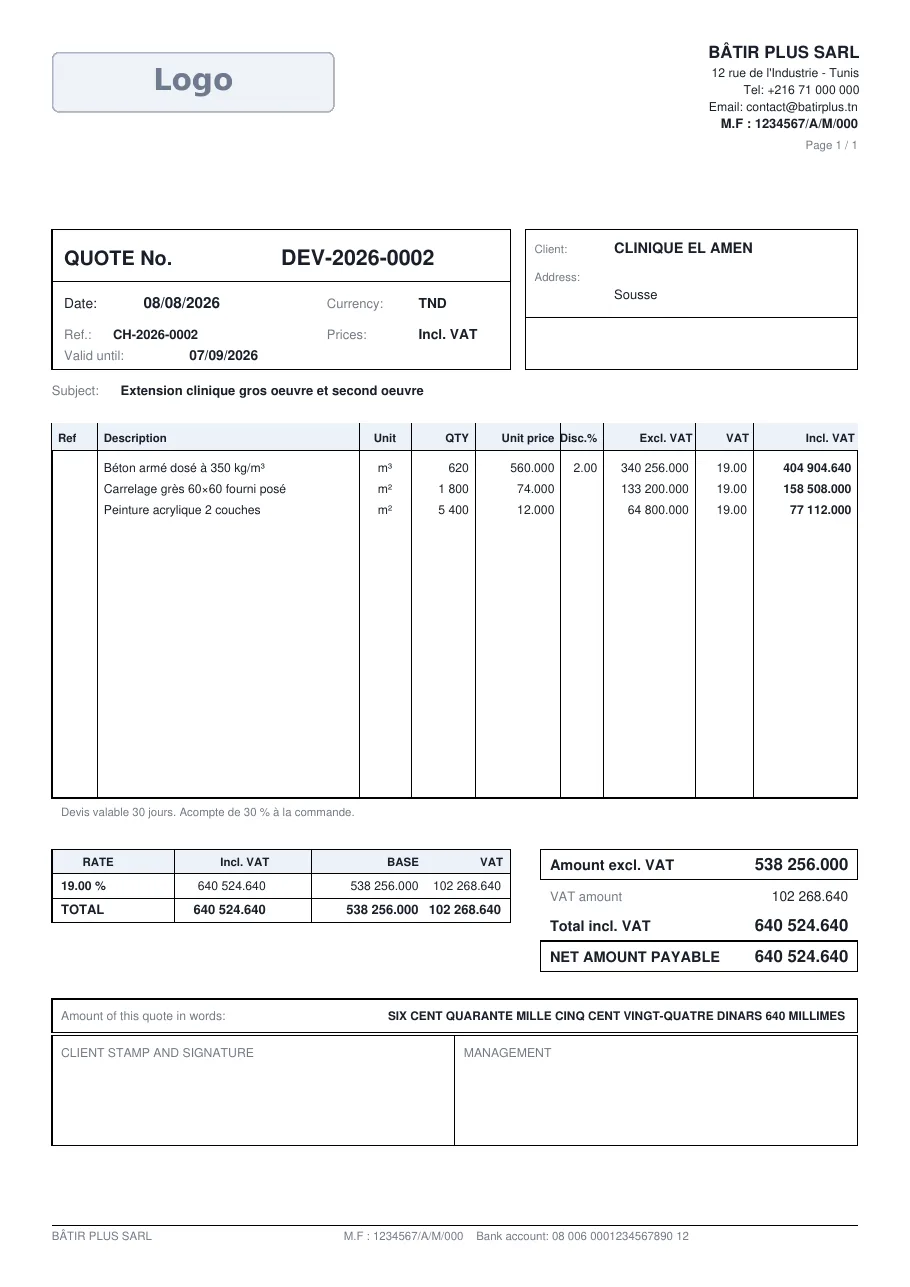
- Line-by-line quotes with discount and VAT, numbered automatically, with a PDF bearing your logo.
- PDF shared by link or WhatsApp, no attachment to prepare.
- An accepted quote turns into a project: its pre-tax total becomes the contract value.
- Quote templates and a library of work items; your client can accept the quote online, from a link.
Purchasing & Comparison
- Purchase requests entered by the job site, then submitted for approval.
- Online consultation: each supplier enters their prices from a personal link received by email.
- Comparator: best price per line, best combination of suppliers, savings in figures.
- Purchase orders with PDF, followed by partial or full goods receipts.
Inventory
- Central warehouse, job sites, vehicles, stores: inventory is tracked by location.
- Receipts, issues, transfers, returns, job site consumption and stock adjustments, all traceable.
- Low-stock and out-of-stock alerts; an issue larger than the available stock is rejected.
Crews & Time Tracking
- Employees and crews; daily timesheet per project: present, absent, late, on leave, travelling.
- Regular hours and overtime calculated from clock-in and clock-out times.
- Approval by the manager, then a monthly summary per employee.
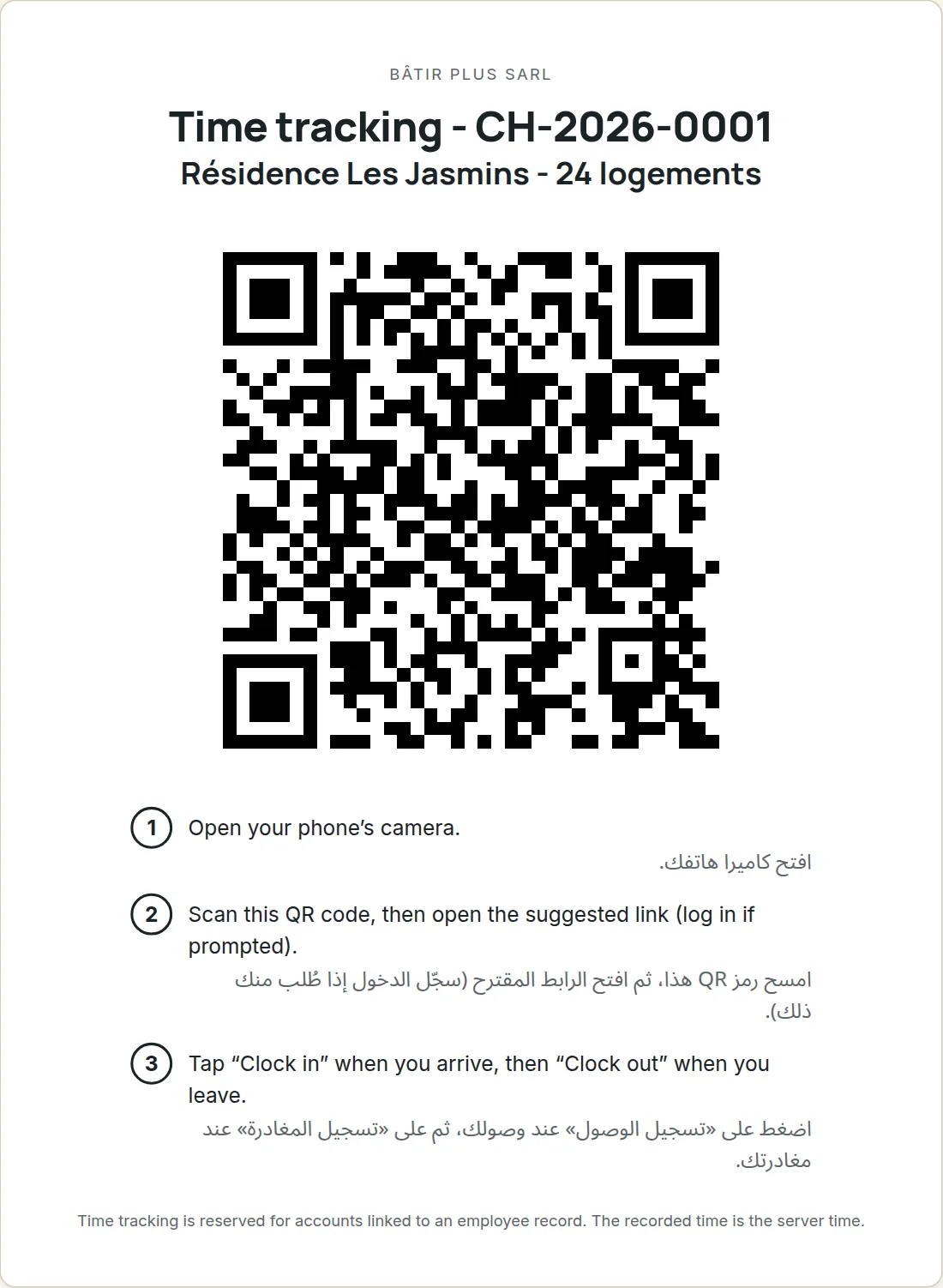
- QR poster per job site: employees scan it and clock in from their phone.
Finance & Profitability
- Progress claims by work package (retention, advance payment deducted) that generate the invoice.
- Itemized client invoices with PDF, numbered supplier invoices, incoming and outgoing payments.
- Actual project cost: received purchases, tracked labor, subcontracting and equipment.
- Margin to date, budget variance, amount left to invoice and left to collect, project by project.
- Reminders for unpaid invoices, tax stamp and withholding tax, CSV accounting export for your accountant.
And also
- CSV import of your clients, leads, contacts, suppliers, products, categories and employees, with checks before saving.
- Your company logo on your quotes, invoices and purchase orders.
- In-app notifications: purchase requests to approve, offers received, goods receipts, accepted quotes, low stock.
- Equipment and machinery, maintenance, subcontractors and subcontracts, leave.
- A guided tour on first login, to discover the screens in order.
- Weekly email report, and alerts when a project reaches 80% and then 100% of its budget.
- PDF progress report to hand to your client, with no budget, cost or margin.
- Vehicles and heavy equipment assigned to projects, fuel logs, reminders before insurance, roadworthiness inspection, road tax and licenses expire.
Field mode
On the job site, even without signal
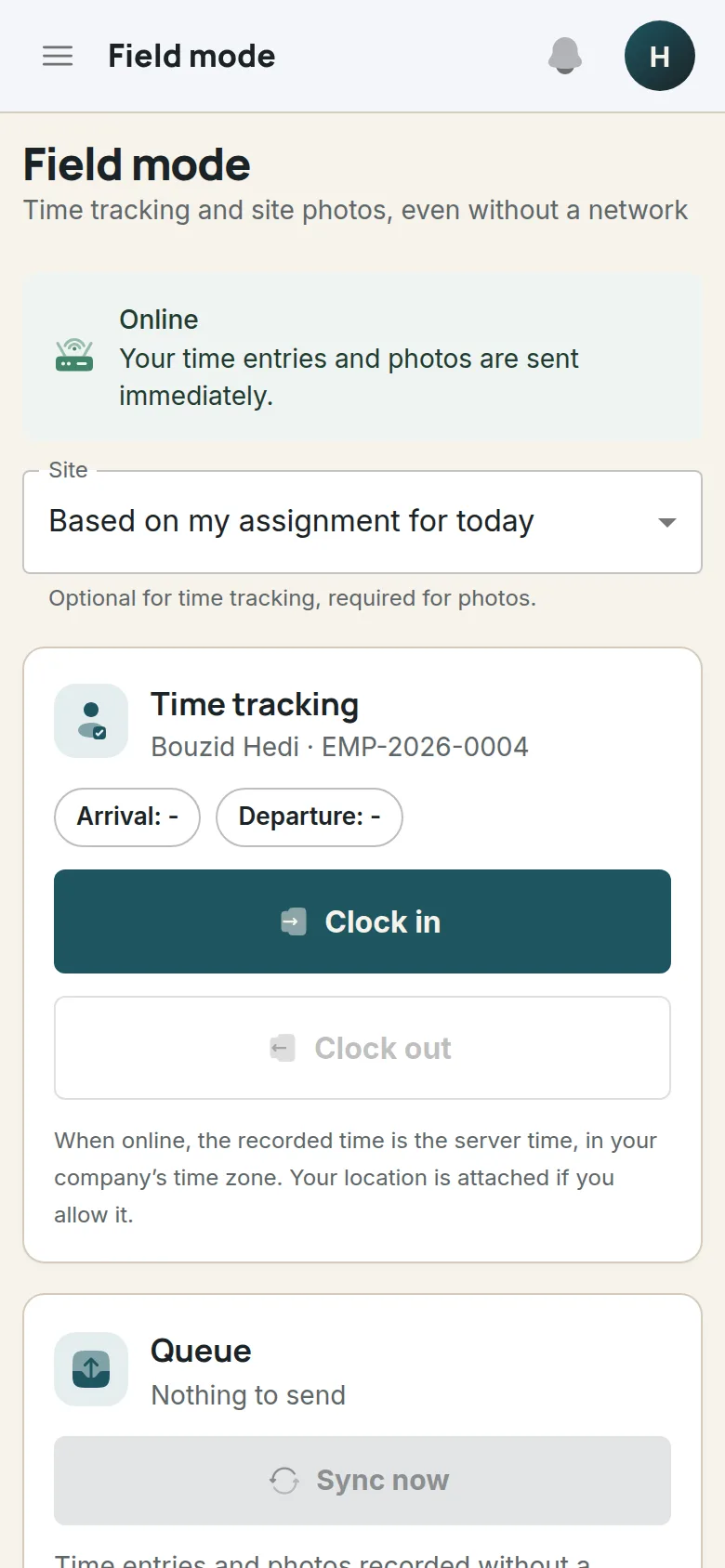
Field mode is a screen designed for the phone: clock in and out, take photos of the site. If there’s no signal, whatever was entered is held on the phone, then sent once the connection is back.
- Clock in and clock out with two buttons, for every employee whose account is linked to their record.
- Without signal, time entries and photos join a queue shown on screen, sent as soon as the connection returns while the app is open.
- Job site photos taken on the phone, compressed before upload and filed in the project gallery.
- Printable QR poster for each job site: employees scan it to open that site’s time tracking.
- Web app you can add to your phone’s home screen, no app store required.
Good to know: only time tracking and photos work offline. Lists and management forms (quotes, purchasing, inventory, invoices…) require a connection.
Progress claims
Bill as the work progresses
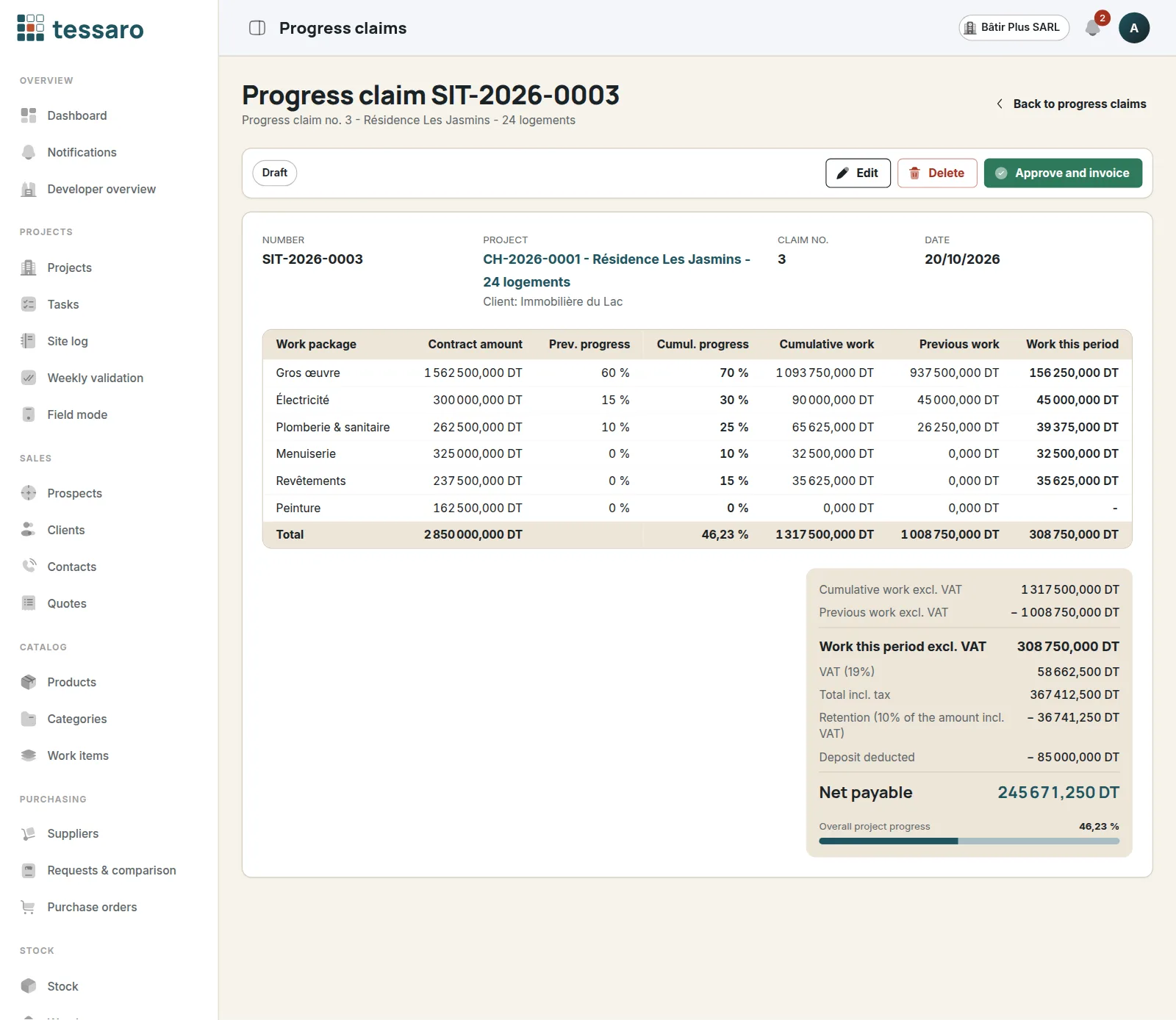
For each claim, you enter the progress of every work package: Tessaro calculates the work done in the period, deducts retention and the advance payment, then generates the invoice.
- Cumulative progress per work package; work from previous claims is deducted automatically.
- VAT, retention and advance payment deduction: the net amount due is calculated for you.
- “Approve and invoice” creates the matching client invoice, with its lines and PDF.
- Numbered supplier invoices and payments: invoiced, collected and outstanding amounts at a glance, project by project.
Client portal
Your clients follow their project
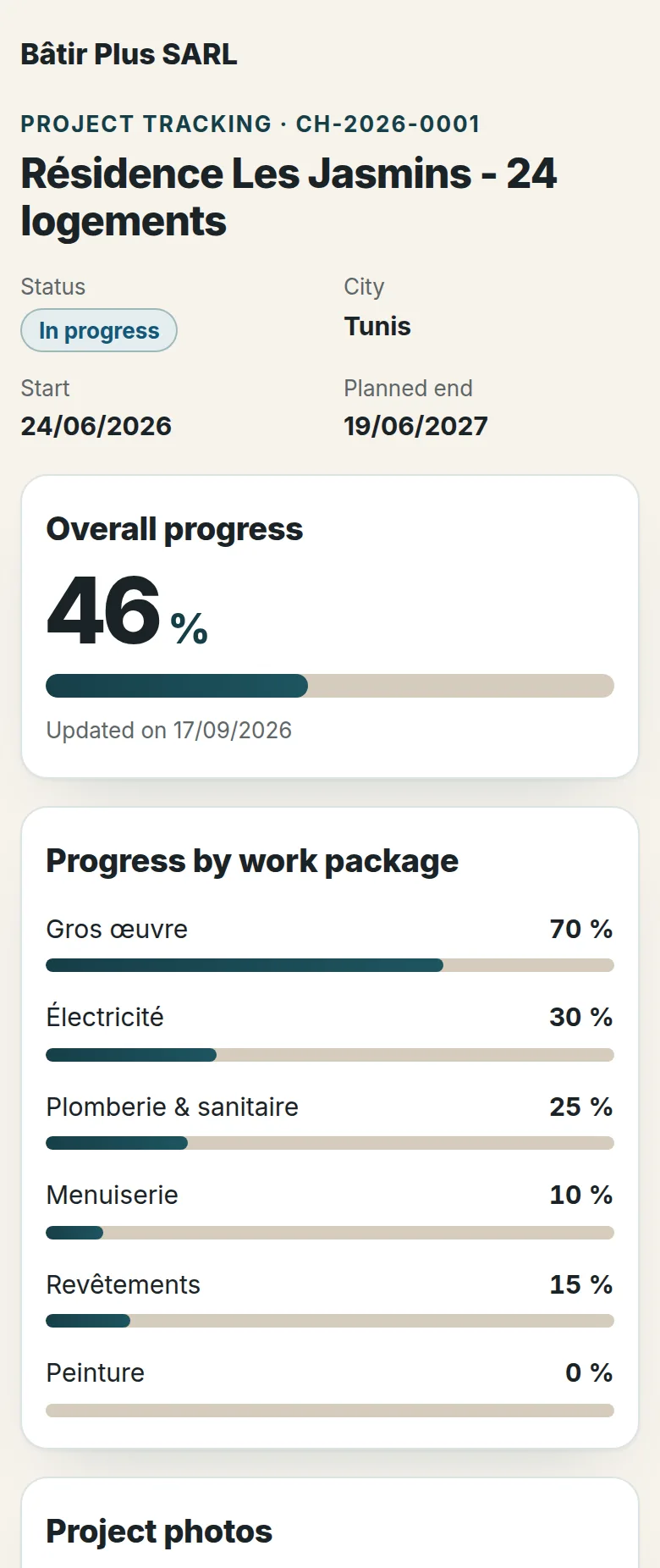
You enable a private link for a project and send it to your client. They can see how the work is going, without creating an account.
- Overall progress and the progress of each work package.
- The photos you’ve marked “visible to client” - and only those.
- Their approved invoices, as PDFs, with the balance still due.
- Never your budgets, costs or margins.
- A link to send by WhatsApp or email, which you can regenerate or disable.
- Quotes, invoices and purchase orders are shared the same way: a link to the PDF, valid for 30 days.
Supplier consultation
Request supplier prices online
No more copying out prices received by phone or message: each supplier enters them directly, and their responses land in the comparator.
- From a purchase request, you choose which suppliers to consult.
- Each one receives a personal link by email, valid for 14 days, with no account to create.
- They enter their prices line by line, plus discount, delivery charges, lead time and payment terms.
- You can also enter an offer received another way yourself.
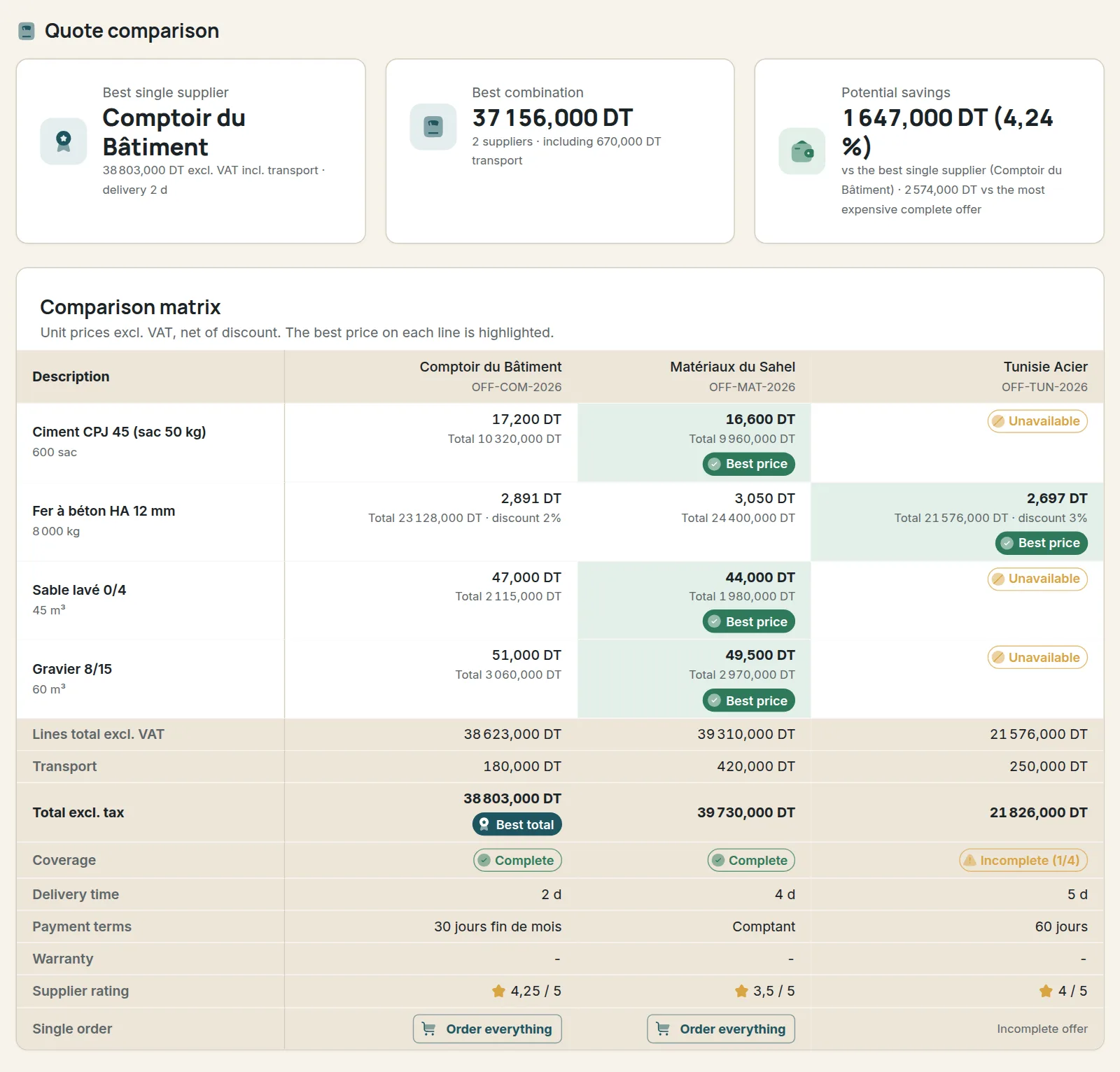
Supplier quote comparison
The cheapest price on every line isn’t always the best buy
Splitting an order across several suppliers lowers prices but adds up delivery charges. The comparator does the full calculation for you.
- Net prices after discount compared for every line of the purchase request.
- Total per supplier, delivery included, with incomplete offers flagged.
- Best single supplier and best combination of suppliers, with the savings achieved.
- At equal cost, the fewest suppliers possible, then the best rated.
- Purchase orders are generated from your choice.
| Item | Supplier A | Supplier B | Supplier C |
|---|---|---|---|
| Cement (50 kg bag)200 bags | 15,800 | 15,200 best price | 16,100 |
| Rebar Ø123 t | 2 450,000 | 2 520,000 | 2 390,000 best price |
| Washed sand40 m³ | 38,000 best price | 41,000 | Not offered |
| Delivery | 140,000 | 0,000 | 150,000 |
| Offer total | 12 170,000 | 12 240,000 | Incomplete offer |
Best single supplierA - 12 170,000 DT
Best combinationB + C - 12 000,000 DT170 DT saved
Illustrative example. Taking the best price on every line would mean using three suppliers for 12 020 DT, delivery included: the B + C combination works out cheaper.
Tessaro in one minute
What the video shows
- The purchase request. The job site lists what it needs: here, four items for a concrete slab.
- Online consultation. Each selected supplier receives a personal link and enters their own prices.
- Offers received. Each supplier’s prices, delivery charges, lead time and payment terms.
- The comparator. Best single supplier, best combination and potential savings; line by line, the best price is highlighted and incomplete offers are flagged.
- The best combination. The cheapest split between suppliers, delivery charges included.
- The purchase order. Each order can be printed or shared as a PDF, by link or WhatsApp.
- The progress claim. Progress by work package, retention, advance payment: the net amount due is calculated, then invoiced.
- Field mode. Time tracking and photos from the phone, even without signal.
- The client portal. Your client follows progress, photos and their invoices from a private link.
Languages
An application in five languages
French, Arabic (displayed right to left), English, Spanish or Italian: you choose your workspace language when you create it, and the whole application follows it.
Chosen when you create your account
- Five languages to choose from: French, Arabic, English, Spanish and Italian
- One language for the whole company, set once and for all: the entire team works with the same labels
- This public website is available in all five languages too
The whole application follows that language
- Login and the management screens: projects, quotes, purchasing, inventory, crews, finance, administration
- Field mode on the phone
- The client tracking portal and the supplier price-entry page
- Emails, exports and PDF documents: quotes, invoices, purchase orders
The app in pictures
What you’ll actually see on screen
Every image on this page is a screenshot of the app, taken from the demo’s fictitious company (demo data). Tap an image to enlarge it.
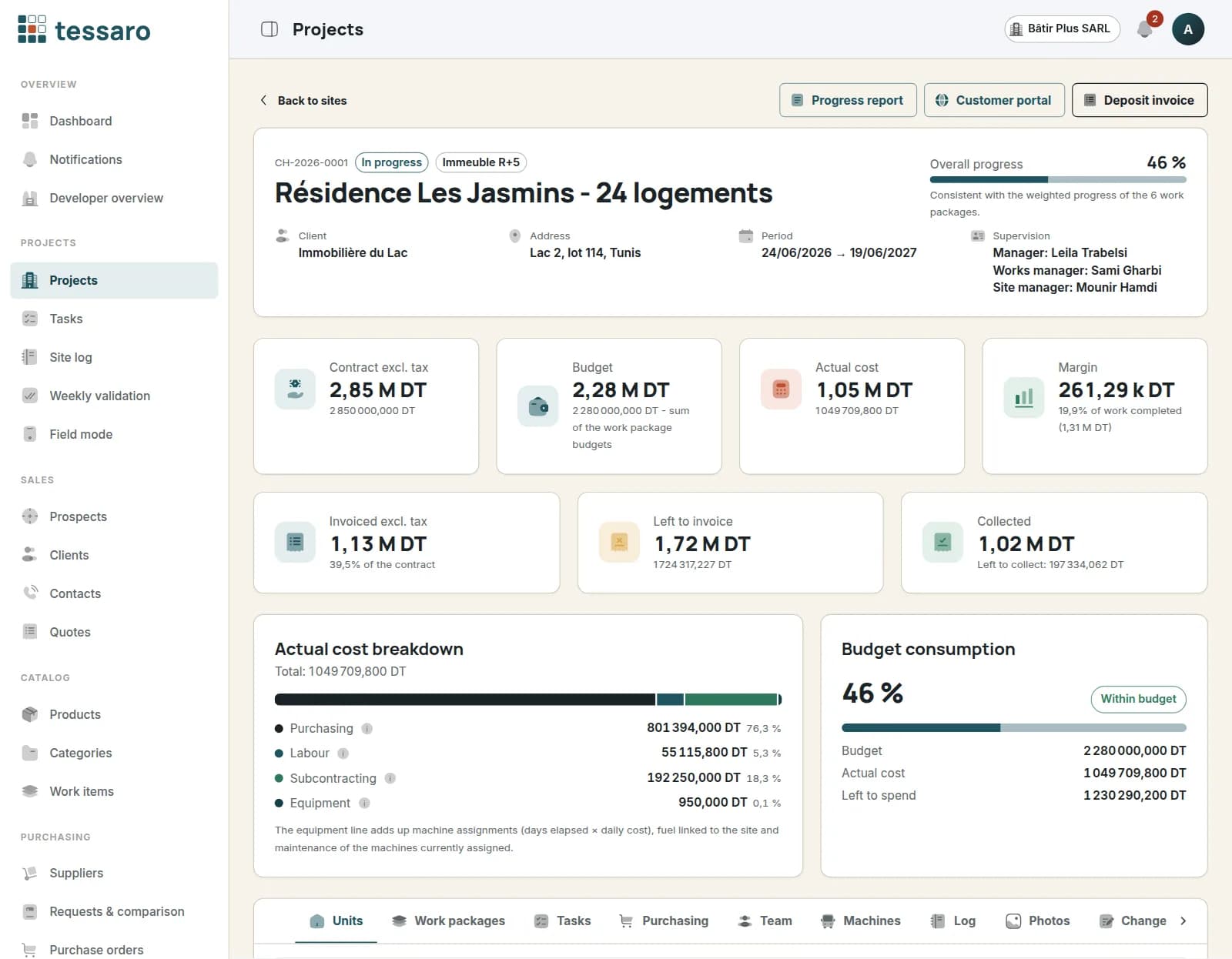
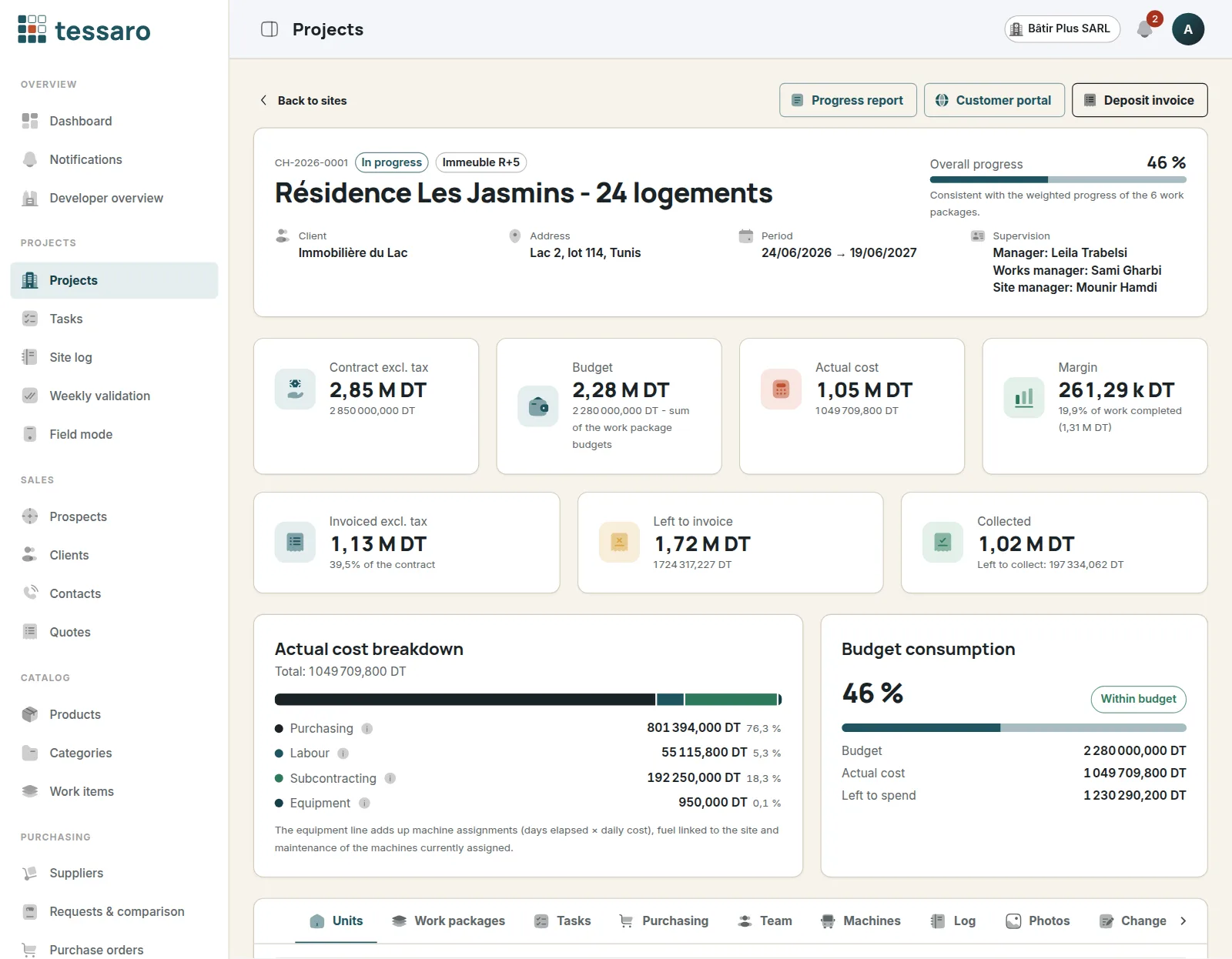
Project recordContract value, budget, actual cost and margin on a single screen, with the cost breakdown and the share of the budget already spent. 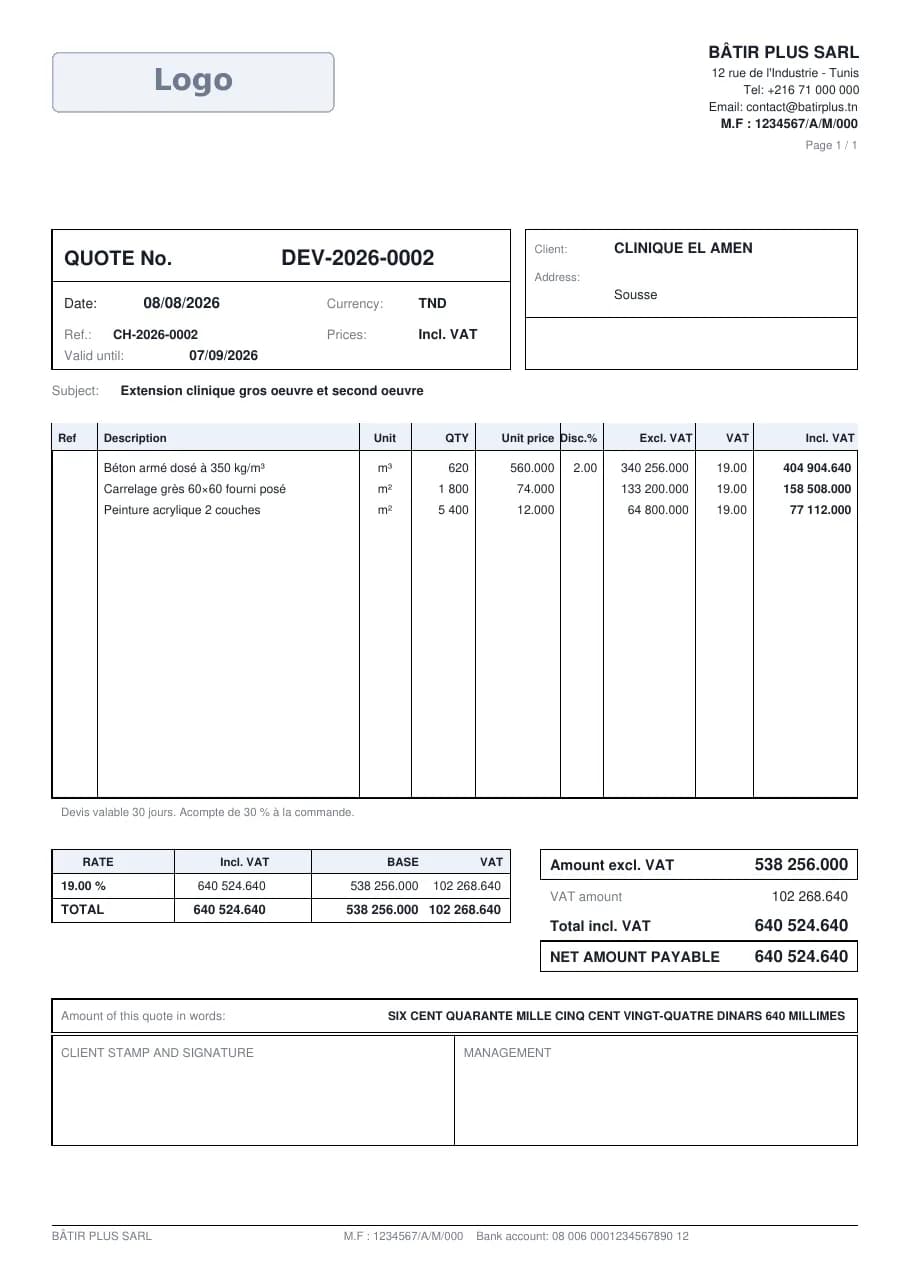
PDF quoteNumbered automatically, with your logo, discount, VAT and the amount in words; print it or share it by link or WhatsApp. See it for yourself
These are the demo screens. Browse them in read-only mode, or create your own trial workspace with your own projects.
How it works
From lead to profitability, in eight steps
Each step builds on the data from the previous one: the project takes shape in the software just as it does on site.
Lead
Log the inquiry and follow it up: contact, site visit, negotiation.
Quote
Price it line by line, send the PDF, then mark the quote as accepted or declined.
Project
Turn the accepted quote into a project and break it down into work packages and tasks.
Purchasing
The job site states its needs; you consult suppliers, compare and order.
Inventory
Goods receipts go into stock; consumption is charged to the project.
Time tracking
Every day, the crew’s hours are recorded - at the office or on site - then approved.
Billing
With each progress claim, work package progress becomes an invoice.
Profitability
Actual costs, margin and budget variance update for every project.
Roles
Everyone sees what they need, nothing more
Nine ready-to-use roles. The company administrator creates accounts and assigns a role to each person.
Administrator
Full access to every module. Manages users and the company profile, and reviews the audit log.
Director
Full access to the business modules - projects, sales, purchasing, inventory, crews, finance. Users and settings in read-only mode.
Purchasing manager
Suppliers, purchase requests, comparator and purchase orders. Updates the catalog and inventory; views projects.
Project manager
Runs projects, tasks and the site diary; manages crews, time tracking, equipment and subcontractors; creates purchase requests and reviews profitability.
Site foreman
Keeps the site diary and tasks, enters and approves time tracking, records stock movements and creates purchase requests.
Sales
Leads, clients, contacts and quotes. Views the catalog and projects.
Accounts
Client and supplier invoices, payments and profitability. Views quotes, purchase orders and time tracking.
Employee
Clocks in and out, submits leave requests, views projects and their site diary.
Accountant (external)
Free read-only access: invoices, payments, progress claims and accounting export. Does not see projects or the dashboard.
Security
Your project figures stay yours
The safeguards below are built into the app; full details are in the documentation.
Roles and permissions
Each role has precise rights per module (view, create, edit, delete, approve, export). They are enforced by the server on every request, not just hidden on screen.
Company isolation
Every record belongs to a company and every request is filtered on the logged-in user’s company: an account never sees another company’s data.
Two-factor authentication
When enabled on the platform, each user can protect their account with a six-digit code generated by an authenticator app (Google Authenticator, Microsoft Authenticator, Authy), with single-use backup codes.
Hashed passwords
Passwords are never stored in plain text: only a bcrypt hash is kept. After several failed login attempts, the account is temporarily locked.
Rotating-token sessions
A short-lived access token and a refresh token renewed on every use, stored in cookies that scripts cannot access. Reusing an old token ends the session.
Audit log
Logins, failed logins, creations, edits and deletions are recorded with the date, user and IP address, and can be reviewed by the administrator.
Export your data
The company administrator can export the company’s data to a file at any time, from “Company → Your data”.
FAQ
Frequently asked questions
Who is Tessaro for?
Building and civil engineering companies running several projects at once: general contractors, structural and finishing trades, developers with their own works crews. Tessaro brings together in one tool what is often scattered across spreadsheets, notebooks and messaging apps: quotes, purchasing, inventory, time tracking, billing and financial tracking.
Does Tessaro work without an internet connection?
Partly. Field mode stays usable without signal for two things: clocking in and out, and taking job site photos. These entries are held on the phone, then sent once the connection is back, while the app is open. Field mode must have been opened once with a connection on that phone. The rest of the app - lists, quotes, purchasing, inventory, invoices - requires an internet connection.
Which languages is Tessaro available in?
Five: French, Arabic (displayed right to left), English, Spanish and Italian. You choose the language when you create your workspace; it then applies to the whole application - login, management screens, field mode, client portal, supplier page, emails and PDF documents - for your entire team, and can no longer be changed.
Can my clients follow their project?
Yes. For each project, you can enable a client portal: a private link to send by WhatsApp or email. Your client sees overall and per-work-package progress, the photos you’ve chosen to show them and their approved invoices as PDFs. They never see your budgets, costs or margins, and you can disable the link at any time.
Can I import my data from Excel?
Yes, in CSV format: save your Excel sheet as CSV, then import it. Import covers clients, leads, contacts, suppliers, products, categories and employees, and Tessaro checks the file before saving. Projects, quotes and invoices are entered in the app.
How does the supplier quote comparator work?
You enter the offers received for a purchase request - unit price, discount, delivery charges and lead time - or you consult your suppliers online: each one receives a link by email and enters their own prices. The comparator shows the best price line by line, each supplier’s total, the best single supplier and the best combination of suppliers, delivery charges included. You then make your choice, and the purchase orders are generated.
How is a project’s profitability calculated?
Actual cost adds up received purchases, tracked labor (hours × hourly cost, with overtime at the higher rate), subcontracting based on progress and maintenance of assigned equipment. Margin is the difference between the contract value and this actual cost; budget variance compares this cost with the planned budget.
Can I use Tessaro on my phone, from the job site?
Yes. Tessaro is a web app that adapts to phones, tablets and computers, and can be installed on your phone’s home screen; it is not an app-store app. Tables turn into lists that are easy to read on a small screen, and field mode brings time tracking and photos together on a single screen.
Is my data kept separate from other companies’ data?
Yes. Each company has its own workspace: all data is tied to the company and the server filters every request on the logged-in user’s company. Each user’s rights then depend on their role, and the administrator can export the company’s data.
Can I try Tessaro for free?
Yes. The free trial lasts 14 days and is set up online, no credit card required: just enter your company name, your email and a password. When the trial ends, access is suspended but your data is kept; to activate your account, contact our team at ayoub_sifaou@hotmail.com.
How do I get access?
Create your trial workspace from the “Free trial” page: you are its administrator, and you then create your team’s accounts and assign each person a role. You can also request access to the demo, read-only on a fictitious company, or email us at ayoub_sifaou@hotmail.com.
Ready to run your projects with the right numbers?
Create your workspace and try Tessaro for 14 days with your own projects, no credit card required.
A question before you start? Email us: ayoub_sifaou@hotmail.com